
Journey Book: Turn Everyday Logs Into a Printable Baby Photo Book
Every parent means to make the baby book. Then the baby arrives, and the baby book joins the list of things that will happen “when things calm down.” Journey Book exists for exactly this: you are already logging the feeds, the milestones, the photos, and the 3 a.m. notes, so the book quietly builds itself from the life you are already recording.
From logs to pages
Here is the whole flow:
- Open the Journey tab and go to Journey Books.
- Tap Create Journey Book and choose which profile (or profiles) the book should cover.
- Tiny Footprints drafts the book for you: pages grouped into age windows, filled with the photos you have logged, captioned with the notes you wrote at the time. That note you typed half-asleep under a photo of a first bath? It is already a caption.
- Make it yours. Swap page layouts, reorder pages, slide each photo within its frame, rewrite any caption, and toggle which stats appear on collage pages.
- Tap Export and the book renders as a print-ready PDF.
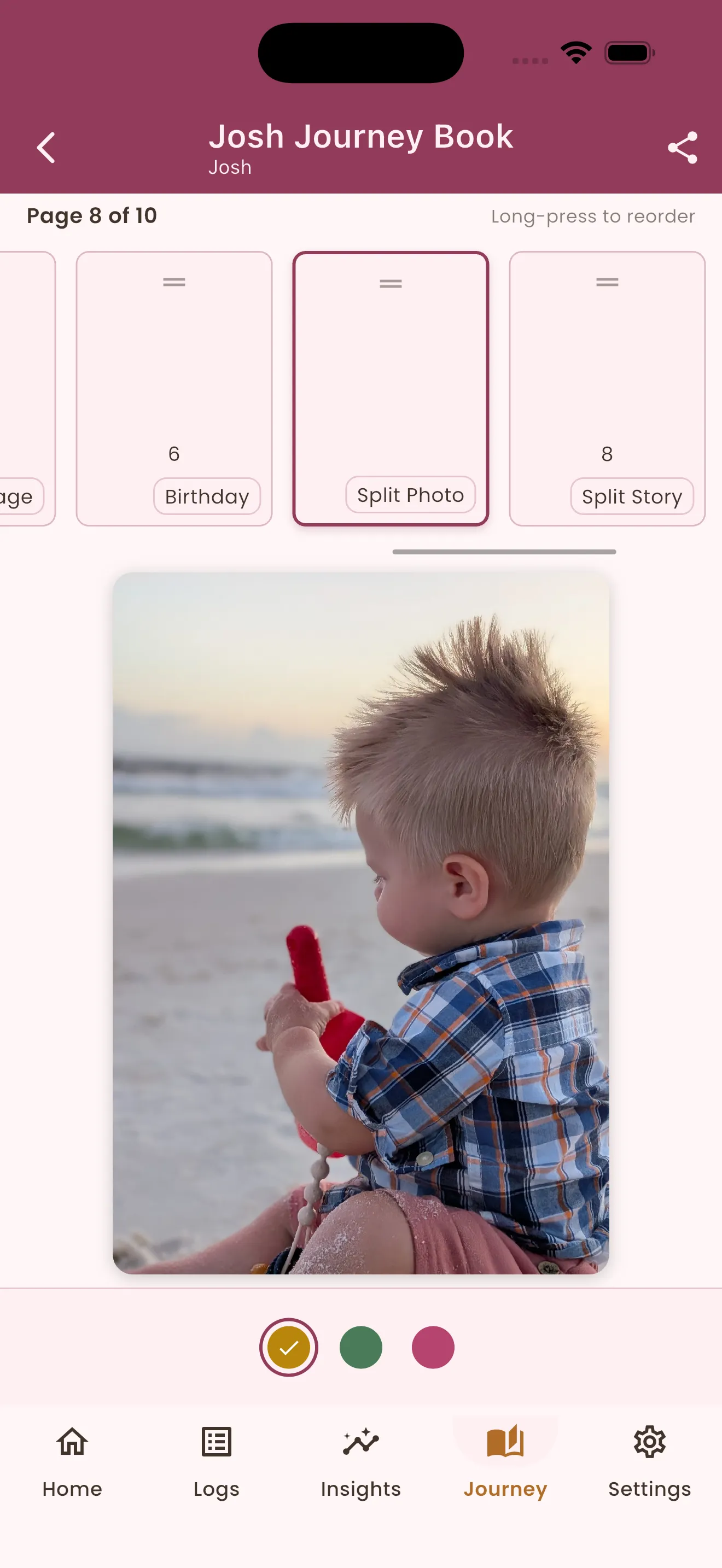
That is the editor mid-polish: the page strip along the top for long-press reordering, the current page front and center, and the book’s theme colors one tap away at the bottom.
The captions are the quiet magic here. Because they start from your own log notes, the book sounds like you on the day it happened, not like you a year later trying to remember.
Two touches make the polishing easy:
- Drag to center. If a photo sits awkwardly in its frame, drag it until the moment is where you want it. Nothing is cropped and the original photo is never modified; you are just choosing which part of it the frame shows.
- Edit captions without touching your logs. Rewriting a caption in the book changes that page only. The original log entry keeps its note, so polishing the keepsake never rewrites your diary.
The page layouts
Every page uses a layout template, from a single full-width moment to a twelve-photo year in review. Dashed blocks below are photo slots; the bars are caption and text blocks that fill from your notes:
Some memories need more words than a caption allows. The Solo Story layout splits the page evenly between one photo and your writing, and Hero Story keeps the photo big while leaving room for a solid paragraph underneath. Both pull their text from the same notes and captions as every other page, so a long journal entry finally has a page shaped for it.
There are also special pages that bookend the story: a Birth Announcement page with the arrival details, and a closing colophon page. The Monthly Collage deserves a special mention: alongside that month’s photos, you choose which stats to show, from growth and milestones to average sleep, wake windows, and feeding, so the book remembers the rhythms as well as the faces.
As many books as your story needs
We do not meter Journey Books. Make one book or ten; give a book twelve pages or two hundred. A book for the first year, a condensed one for each grandparent, one per child so nobody’s story is a footnote in a sibling’s. The only limit that matters is how much of the story you want to tell, and the first-draft wizard means starting another book costs minutes, not weekends.
Print it anywhere
Export produces a standard A4 portrait PDF, rendered at print quality. That format choice is deliberate:
- Print at home on any printer, today, for the fridge or the grandparents’ envelope.
- Take it to any local print shop and ask for a bound copy; A4 is the size every shop handles without conversion.
- Upload it to an online printing service for a hardcover version when you want the heirloom edition.
The PDF is yours, full stop. Keep it in your family archive, reprint it in ten years, send it to relatives on the other side of the world. Your baby’s story is not locked inside an app, and it never expires.
Three habits that make better books
- Write the note in the moment. One honest sentence on a log becomes the caption that makes a page. Future-you will not remember; present-you does not have to.
- Photograph the ordinary. First steps get photographed anyway. The Tuesday-morning oatmeal face is the page you will cry over later.
- Let the draft be a draft. Generate the book, then edit with a cup of tea. Polishing an existing draft is easy; starting from a blank page is why the baby book never happened for previous generations.